




NEW at HOFA-Plugins: Analyzer V3 Presale › ThirdPartyPluginLoader Introductory Price ›
DDP Player V2
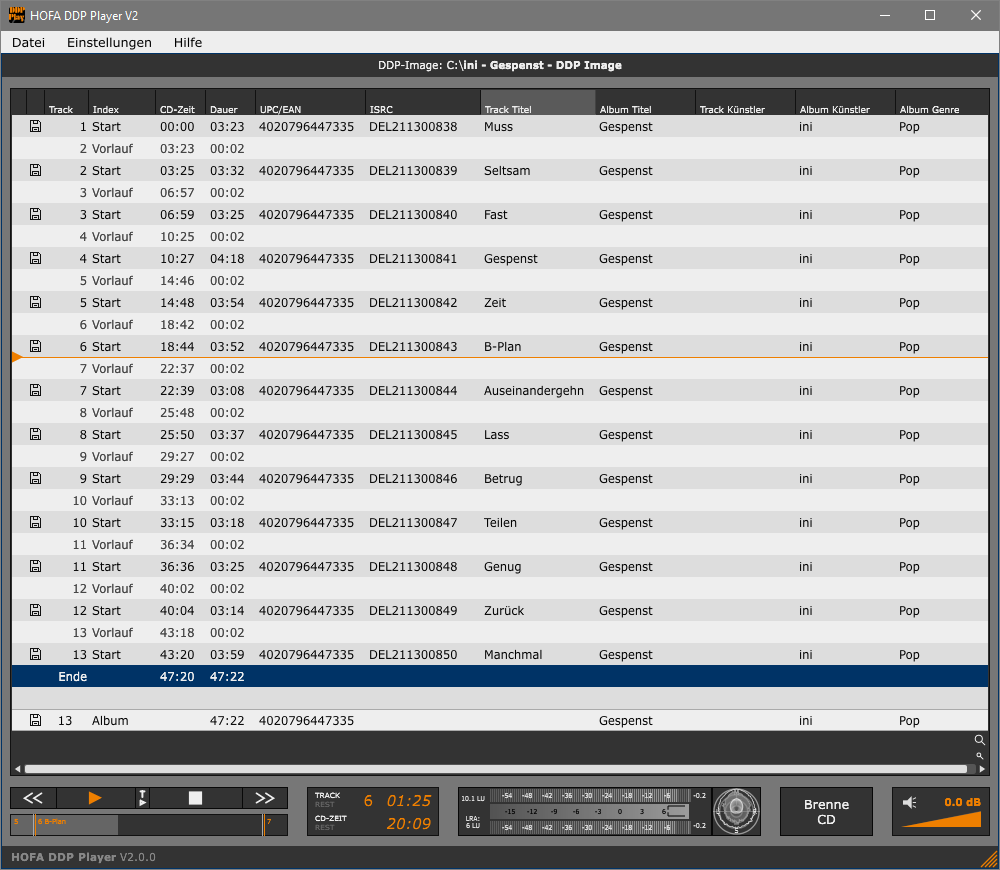
The HOFA DDP Player is a professional tool with which you can easily play, check and burn DDP images to CD.
In addition, CD text and other metadata such as ISRC and UPC codes embedded in the DDP image are displayed for you to check.
Peak and EBU loudness meters and a goniometer are available as well.
Please note: If you want to create individual DDP players for your customers and send them to them, you need the HOFA DDP Player Maker.

HOFA DDP Player is also available in the HOFA DDP Player is also available in the Mac App Store.
Features V2.0.4:
- new in V2
- additional formats for audio file export: WAV, AIFF, FLAC, Ogg-Vorbis, MP3
- CD-Text info is embedded into exported WAV and MP3 files
- track transition playback function
- support for multisession CDs
- revised GUI with scalable font size
- DDP image playback for audio CDs
- burn DDP images to CD
- export tracks as WAV audio files
- CD-Text, UPC/EAN and ISRC
- support of Japanese CD-Text
- peak and EBU loudness meter
- goniometer
- MD5 checksum validation
- easy to use, clear GUI
- support for PC and Mac, 32 and 64 Bit
- English & German version available
FAQ
What is the HOFA DDP Player V2?
The HOFA DDP Player V2 is a professional standalone application for Windows and macOS that lets you play, check, and burn DDP images (Disc Description Protocol) for audio CDs. The tool displays CD-Text, ISRC and UPC/EAN codes, and other metadata, and includes a Peak & EBU Loudness Meter plus a goniometer for professional quality control.
What is the difference between DDP Player V2 and DDP Player Maker?
The DDP Player V2 is designed for your own use: it’s for auditioning and checking DDP images yourself. The HOFA DDP Player Maker goes further, letting you create and send custom, standalone DDP players to clients—so they can audition their mastered albums before pressing, for example. If you only need to check your own DDP images, the DDP Player V2 is all you need.
How do I open a DDP image with the HOFA DDP Player V2?
A DDP image (a folder containing the files DDPID, CDTOC, PQDESCR, and the associated .dat data files) is loaded into the HOFA DDP Player V2 via drag-and-drop or the Open dialog. After that, all functions—playback, burning, export, and metadata display—are immediately available.
Which audio formats can be exported by the HOFA DDP Player V2?
The HOFA DDP Player V2 exports individual tracks from a DDP image to the following formats: WAV, AIFF, FLAC, OGG Vorbis, and MP3. CD-Text information is automatically embedded in WAV and MP3 files. This feature was introduced with version 2.
Operating System: macOS 10.13 or later, Windows 10 or later
You have two licenses available. These are managed via the HOFA Plugins Manager, where they can also be deactivated and transferred to other computers.
It is also possible to activate and use HOFA plugins offline. Licenses on USB sticks can be used alongside USB licenses from other plugin manufacturers without any issues.
You can read the detailed manual here:
You will find helpful answers to many questions in our support center:
You can also reach us on weekdays at [email protected] and +49 7251 3472-444
3 reviews for DDP Player V2
Istvan –
Working with Sonic Studio PreMaster CD more than two decades, the last years – when PreMaster CD no longer was compatible with the current OSX – was not solution for for us to making DDPs on our Macintosh ecosystem until I heard about HOFA. Running Digital Pro studio where we still have a chance to work with DDPs – besides everyday working from analog tape mixes to Dolby Atmos mixes – it is a great solution for having a really professional looking and sounding tool the HOFA CD-Burn.DDP.Master!
Nicht verifizierter Kauf. Mehr Informationen
La Huppe –
Awesome tools for CD previewing. I send links to my clients to listen to DDP files. Because once its pressed, it’s final !
Nicht verifizierter Kauf. Mehr Informationen
Dave –
Very useful for my clients previewing the CD before signing off on the project. HOFA DDP Player sounds good and has all the features you need. Great product support also.
Nicht verifizierter Kauf. Mehr Informationen