
IQ-Series EQ V3

Intelligent, dynamic, sexy

129,90  incl. VAT

This plugin has the potential to replace all of your EQs and compressors. It takes your productions to a new level. Mixing and mastering has never been so easy …

Multiple Grammy Award Winner Norberto Islas:

“I know quite a lot great EQ plugins but the HOFA IQ-Series EQ is the best for me because of the precision and accurate sound…”

Producer, mixer and Recording Engineer from Mexico and six-time Grammy Award winner (3x Grammy, 3x Latin-Grammy)

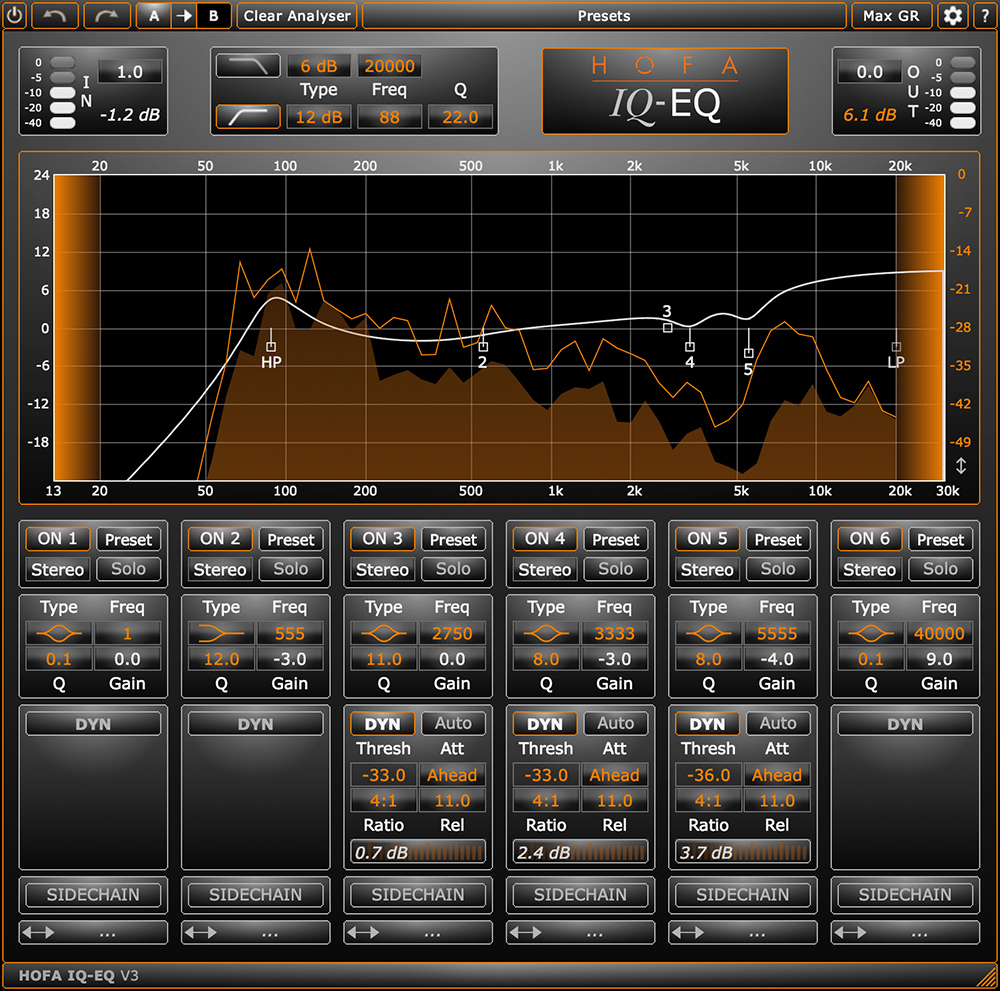
The IQ-Series EQ offers unique features and can serve as a complete high-end channelstrip.

This video will show you all of these fantastic features and how to use them in your mixes and masters.

Features V3.7.18:

  • Extended frequency range 1 Hz – 40 kHz for each of the 6 bands
  • 16 different filter types (6 shelves, 4 high cuts, 4 low cuts, peak, flat)
  • Stereo, left, right, mid or side processing per band
  • IQ dynamics per band (compression & expansion)
  • Look ahead & live mode
  • Sidechain (external & internal, e.g. 100 Hz controls 10 kHz)
  • High and low cut with selectable 6/12/24/48 dB slope
  • Analyser with hold function
  • Solo mode for each IQ-Series EQ band
  • Scalable plugin window size
  • 64-bit internal processing

HOFA CEO Jochen Sachse explains a new method for compression, which is not only suitable for challenging vocal tracks.
Complex recordings like piano, guitars or keyboards can be controlled easily.

With the IQ-Series EQ you can realise:

  • top level mixes and masters
  • innovative sound shaping due to simultaneous dynamics and frequency editing
  • balanced vocals without compromises
  • powerful synths and guitars without muddy resonances
  • powerful bass without boominess
  • extreme processing – but only when it is necessary
  • subtle sound shaping for mastering
  • perfect de-essing

FAQ

What is the HOFA IQ-Series EQ V3?

The HOFA IQ-Series EQ V3 is a versatile dynamic equalizer for mixing, mastering and sound design. Unlike a traditional static EQ, it does not permanently alter the frequency response, but reacts based on the signal level: Each of the 6 bands has its own dynamics section with compression and expansion, so that a frequency is only boosted or cut if it exceeds a user-definable threshold. This allows you to specifically control resonances, sibilants or boomy bass without affecting the original sound in sections where there are no issues.

The IQ-Series EQ V3 is ideal for anyone looking to go beyond the capabilities of a traditional static EQ in their audio production. The following user groups will benefit in particular:

  • Mixing and mastering engineers who want to combine surgical frequency adjustments and dynamic processing in a single tool
  • Producers and beatmakers who work in-the-box and can reduce the number of plugins they use thanks to the channel strip concept
  • Pros in post-production, broadcast and game audio, thanks to latency-free live mode and precise sidechain control
  • Ambitious home studio users who want to cover many different tasks with a single plugin
  • Beginners who benefit from the intuitive drag-and-drop interface and the integrated analyser
  • Advanced users who want to exploit the full potential of mid/side processing, external sidechain and oversampling

In short: wherever you need to shape sound precisely, dynamically and musically, the IQ-Series EQ V3 is the perfect tool.

Users typically apply the IQ-Series EQ V3 for the following purposes in mixes:

  • Vocals: reduce problematic resonances automatically without altering the fundamental tone
  • Guitars: smooth harsh frequencies only when they are really distracting
  • Basses: dynamically control boomy low-mids rather than cutting them permanently
  • Synths and keys: attenuate sharp resonances without making the sound thin
  • De-essing: precisely reduce sibilants using the sidechain function

In mastering, the dynamic character is particularly important. For example, you can intervene only when a loud refrain is cluttered in the mid range, or selectively process stereo elements in the side channel without affecting the mid-signal. The high internal resolution (64-bit, up to 32x oversampling) ensures clean, artefact-free results.

With mid/side processing, the stereo signal is split into a mid component and a side component. This allows you, for example, to process the bass frequencies only in the mid channel without affecting the stereo image, or to boost the treble and spatial depth only in the side channels. This is a key technique in mastering and is available in every band of the IQ-Series EQ V3.

An external sidechain allows you to control the dynamic processing of an EQ band using another signal. A classic example: you send the kick drum as a sidechain to a specific frequency range on the bass track and automatically attenuate that range when the kick plays – this makes room in the low-end without reducing the overall volume of the bass.

Beide arbeiten mit Frequenzbändern, unterscheiden sich aber in der Filterstruktur:

AttributeDynamic EQMultiband compressor
Filter curvesClassic EQ curves (Bell, Shelf, Cut)Crossover filters (low-pass/high-pass)
Phase behaviourLow phase distortion without activityPermanent phase distortion caused by crossovers
OperationEQ-centred with a threshold per bandCompressor-centred per band
Typical applicationHigh-precision surgical adjustmentsGlobal dynamic processing in wide bands

Use dynamic EQ if a problem only occurs occasionally:

  • A vocal track that only sounds harsh around 4 kHz during loud passages
  • A bass guitar that only booms on certain notes between 200–300 Hz
  • Cymbals that are too prominent in the choruses, but not in the verses
  • An electric guitar with boomy low-mid frequencies when playing palm-mutes

A static EQ would permanently cut these frequencies, making the sound thin in the sections where there are no issues.

Look Ahead delays the audio signal so that the detector can analyse it ‘in advance’. This allows the EQ to detect even very fast transients and respond accordingly – ideal for precise de-essing or transient control. The DAW’s automatic latency compensation then ensures that everything remains in sync. In the IQ-Series EQ V3, you can activate Look Ahead using the Attack control.

Oversampling internally processes the audio signal at a higher sample rate (e.g. 8x, 16x or 32x). Specific benefits:

  • Clear sound in the high frequencies: Filtering in the upper frequency range becomes more precise and natural.
  • Versatile: Low oversampling is often used in the mix for performance reasons, whilst high oversampling is used in mastering for the final render.
    Shifts the Nyquist frequency upwards: harmonics that may occur during dynamic processing are shifted outside the audible range and are no longer reproduced during playback – aliasing artefacts are therefore significantly less noticeable.

Yes. The latency-free Live mode is designed precisely for this purpose. This means the plugin can also be used in live setups, for recording monitoring or in broadcast workflows where latency is not acceptable.

In the IQ-Series EQ V3, you can freely change the order of the separate bands. Using drag-and-drop on the double arrow in the section below the display, you can move each band to a different position within the signal chain. As the EQ processes the bands in series (i.e. one after the other), the order has a noticeable effect on the sound when using dynamic processing.

Specific advantages of the variable band order:

  • Different sequences produce different results: A band that dynamically reduces the level, positioned before a boost, sounds different from one positioned after the boost – because the subsequent band ‘sees’ a different input signal in either case.
  • Using channel strip logic: In channel strip mode with a full-range compressor, you can choose whether the bands take effect before or after the global compression – two completely different workflows.
  • Overview and workflow: You can create a clear order of the bands at any time, for example to sort the frequencies in ascending order. Bands can also be named, so that even in complex setups you always know which band is responsible for what.

In short: the order is not merely a matter of aesthetics, but a tool that has a significant effect on the sound and, in conjunction with the dynamics section, opens up new possibilities for shaping the sound.

In Auto mode, the plugin automatically adjusts the time parameters. Instead of manually setting the attack, release and ratio, the plugin analyses the input signal and continuously adapts the attack and release behaviour of the dynamics section to the sound material.
This has the advantage that you don’t have to worry about attack and release values; you simply set the threshold and gain – ideal when mixing in a tight schedule.
If you want more control, you can switch to manual mode at any time. There are ratio values (2:1 to 12:1 for compression, 1:2 to 1:12 for expansion) as well as attack and release controls.

Yes. The IQ-Series EQ V3 offers a dedicated preset function for each band, so you can recall not only the entire plugin but also single filter bands, including their dynamics and sidechain settings.
Here’s how it works:

  • Preset button on the band: Each active filter band has its own “Preset” button. A single click opens the preset menu for that specific band.
  • Three options in the submenu:
    • HOFA Presets – pre-configured band setups from the HOFA team (e.g. typical de-esser, resonance or vocal cleaning settings)
    • User Presets – your own saved band configurations (available as soon as you have created your own presets)
    • From IQ-Analyser – if you are using the HOFA IQ-Analyser at the same time, automatically detected or manually marked peaks/dips can be transferred directly and used as a band preset
  • Saving your own setups: Use ‘Add Preset’ to save all the settings for a band as a reusable user preset.

This allows you, for example, to save a perfectly tuned de-esser band configuration once and reuse it at any time later.

The IQ-Series EQ V3 is connected to the HOFA IQ-Series Analyser V2. Marked peaks and dips from the Analyser are automatically saved as band presets in the EQ – saving you the trouble of manually entering frequencies.

Here’s how it works:

  • Prerequisite: IQ-Series EQ version 3.7.3 or later and IQ-Series Analyser V2 on the same computer
  • Set markers: In the Analyser, either use Alt+mouse click (the marker snaps to the nearest peak/dip) or the Auto-Marker function, which automatically detects relevant peaks and dips
  • Apply to the EQ: Click the ‘Preset’ button on an active band position and select the desired marker from the ‘From IQ-Analyser’ sub-menu – the band is immediately set to this frequency

This allows you to quickly identify problematic frequencies using the Energy and Peak curves of the IQ-Series Analyser and apply them to the EQ with a single click.

With just a few adjustments, the IQ-Series EQ V3 transforms into a fully-fledged high-end channel strip. The key is the ‘Flat’ filter type, which puts a band into full-range mode: instead of processing just one frequency, the dynamics section of this band accesses the entire frequency spectrum and works like a classic compressor (or expander, depending on the ratio).

Here’s how to build a channel strip:

  • Flat filter as a full-range compressor: Set a band to “Flat” and define the compression behaviour via Threshold, Ratio (2:1 to 12:1) and, if necessary, Attack/Release.
  • Use other bands as EQ: Bell and Shelves on the remaining bands shape the sound in a classic way.
  • Choose the order carefully: Using drag-and-drop, you can decide whether the full-range compressor acts before or after the EQ bands – producing two noticeably different sound results.
  • Combine multiple dynamics stages: Multiple flat bands allow, for example, gentle level control followed by tighter compression or an expander.

Feedbacks

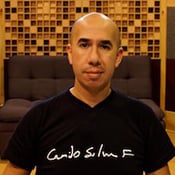
“The IQ-EQ is my main weapon of choice!
The only EQ powerful enough to solve even the most troubled tracks I get for mastering. If you combine its already impressive capabilities with external control signal sidechaining, both corrective and enhancement possibilities are just endless.”

Camilo Silva F.
Mastering Engineer
Chia, Colombia

 

The HOFA IQ-Series EQ is one of the plugins that you do not want to lose if you had it in use once before.
The concept is ingenious …
The dynamic function saved us a lot of work and allows completely new possibilities.
The equalizer is designed for the use on individual tracks as well as mastering.

Buenas Ideas

Because of its excellent sound quality, its clear interface and its low resource requirements the IQ-Series EQ was satisfying in our test across-the-board.
In particular the Dynamic Gain function makes this flexible equalizer an effective troubleshooter, which even enables drastic corrections, which are only implemented when necessary.

Rating 6 out of 6 points / Editor’s Choice

Beat magazine

There’s just so much this single plugin can do. Apart from needing reverbs (which they make and I will write a review for soon) and delays (maybe we can convince them to make an IQ-Series Delay) you could mix and master entire projects with this single plugin and want for nothing. (…)
Since getting IQ-Series EQ, I’ve pretty much used it on every track that needs any frequency processing, (…) I hate overhyping anything but this is the most versatile EQ plugin I’ve used in a very long time.

Everything Recording Rating: 5 Sterne

Everything Recording
read the article

I cannot say enough how excited I am about the HOFA IQ-Series EQ plugin.  I have been mixing and recording out of the box for decades and it has been challenging for me to make the transition to ITB mixing.  Mostly because there are a few indispensable tools that have only existed as rack mount devices.  For decades I have relied on the BSS 901 mkii Dynamic Equalizer as a sort of “secret weapon” for fixing problematic vocal recordings or harsh guitar sounds.  FINALLY!  HOFA has created a plug in that does everything the BSS did and much much more.  The extraordinarily tight Q settings, the wonderfully flexible shelf shapes and Being able to automate the controls makes IQ infinitely more useful for me.  Whether I am mixing in the computer or on my console, the HOFA IQ-Series EQ is my new secret weapon!!

Eric Valentine
UnderToneAudio.com
San Francisco | USA

The HOFA IQ-Series EQ really deserves the name “IQ”. Its handling is absolutely intuive; by sweeping in the display you can quickly find the desired frequencies and the appropriate parameters and control them.
I got along with it as fast as with no other EQ.
The sound of the HOFA IQ-Series EQ is sophisticated, clear and pure.

Olaf Hemker
Tonmeister
klang:art Tonstudio

8 reviews for IQ-Series EQ V3

  1. German

    Wilhelm

    Ich war skeptisch, ob ich wirklich noch einen „neuen“ EQ brauche – aber der HOFA V3 ist keine Spielerei, sondern ein durchdachtes Werkzeug für höchste Präzision. Die Möglichkeit, mitten im Band dynamisch zu arbeiten, ist im Mastering extrem wertvoll – z.B. um nur die problematischen Mitten während starker Passagen leicht zu dämpfen, ohne die Balance zu verlieren.

    Besonders beeindruckt bin ich von der internen Verarbeitung (64 Bit + Oversampling) – man hört’s. Und das Band-Soloing ist ein unterschätzter Gamechanger, gerade für mikroskopisches Arbeiten. Der V3 ist für mich inzwischen Standard – neben den Klassikern wie Pro-Q oder Weiss.

    Nicht verifizierter Kauf. Mehr Informationen

  2. German

    Daniel

    Ein EQ, der alles bietet was man braucht. Setze den EQ in allen möglichen Zusammenhängen ein. Besonders das dynamische EQing ist sehr nützlich. Mittlerweile mein #1 EQ.

    Nicht verifizierter Kauf. Mehr Informationen

  3. English

    Mitch Zelezny

    Been mixing for over 40 years, mastering for 20, using Hofa IQ-series EQ for 10. The first dynamic eq. I ever used, it offered an incredible leap in control over multi-band compression. In fact, the unrivaled capacity to manipulate the level and dynamics of an easily defined frequency range specific to the panoramic field, entirely changed my approach to mixing and mastering! . . . I’ve tried many alternatives with arguably more modern looking graphic designs, but NONE have offered a more straight forward interface to control EVERY parameter necessary to achieve my goals. This is a tool for professionals that easily allows for high resolution changes, which even includes independent attack, release, and side-chain properties for every band and degrees of over-sampling on the output. . . Truly a Swiss army knife and my “go to” tool that unleashed a decade of creativity and helped refine my aesthetic. Thank you Hofa!

    Nicht verifizierter Kauf. Mehr Informationen

  4. English

    Boris

    Best eq ever
    Incredibly useful.
    You can mix only with this plugin.

    Nicht verifizierter Kauf. Mehr Informationen

  5. German

    Nabil

    Ein EQ mit allen Funktionen, die Du Dir wünschen kannst. Wenn es mal wirklich ins Detail geht, sei es auf Komplexeren Stems die ein Kunde geschickt hat (gerade im HipHop nicht unüblich, dass eine Sammlung von Gitarren und Synths mit Reverbs etc. bereits enthalten als ein Stem ankommen…) oder beim Mastern, ist mein erstes Plugin in der Chain oft dieser EQ. Pro Filter kann man sowohl was dynamisches Verhalten, Mid/ Side Balance und Sidechaining angeht extrem detailliert arbeiten, der Klang ist dabei immer sehr transparent und die Bedienung einfach. Das Nutzerinterface schien für mich erst etwas in die Jahre gekommen, doch mittlerweile liebe ich es genau so und würde es nicht ändern wollen! Definitiv eines meiner Lieblingsplugins! <3

    Nicht verifizierter Kauf. Mehr Informationen

  6. German

    Christian

    Sehr gutes Plugin für Mixes. Alle Features, die es braucht, sind vorhanden. Klangneutral, präzise und man hat alles Bedienelement gut im Blick. Dynamische EQing ist intuitiv. Die Anzeige der Hüllkurve übersichtlich, schnell und gut ablesbar.

    Nicht verifizierter Kauf. Mehr Informationen

  7. German

    Ingo

    Eine super Arbeit
    Der IQ EQ Ist Nr 1 in der Plugin Liste und bei mir auf wirklich jeder Spur zu finden.
    Wenn nicht als EQ dann als dezenter De Esser oder sogar als Compressor denn alles das kann er.
    Egal wo er gerade gebraucht wird ob im Seitenband oder nur ab einer gewissen Pegel, der IQ EQ Macht einfach einen echt guten Job.

    Nicht verifizierter Kauf. Mehr Informationen

  8. German

    Alexander

    Klingt sehr gut für mein empfinden und ist sehr flexibel ! Super finde ich das online und offline verschiedene Renderqualitäten (Oversampling )einstellbar sind. Ebenso dass dynamisches und auch mid/side EQing möglich ist.

    Nicht verifizierter Kauf. Mehr Informationen

Show only reviews in English (2)

Add a review

Formats: VST3, AU, AAX

Operating System: macOS 10.13 or later, Windows 10 or later

HOFA plugins are continuously tested on the following DAWs:
Ableton Live, Apple Logic, Avid Pro Tools, Bitwig, Cockos Reaper, Image Line FL Studio, Magix Samplitude/Sequoia, Presonus Studio One, Steinberg Cubase/Nuendo/Wavelab

You have two licenses available. These are managed via the HOFA Plugins Manager, where they can also be deactivated and transferred to other computers.

It is also possible to activate and use HOFA plugins offline. Licenses on USB sticks can be used alongside USB licenses from other plugin manufacturers without any issues.

You can read the detailed manual here:

You will find helpful answers to many questions in our support center:

You can also reach us on weekdays at plugins@hofa.de and +49 7251 3472-444

IQ-Series EQ V3

14 days free trial