

DDP Player Maker V2

Create DDP Players for your clients

99,00  incl. VAT

If you want to deliver DDP images to your clients with a matching player software, DDP Player Maker is the perfect solution for you.

Whether your clients use Windows PCs or Macs, the DDP player works on both platforms. You can customise the splash screen and add your logo, a custom info text and a link to your website. You can also decide whether the DDP player should be able to burn CDs and include your “terms of use” that your clients have to accept before they can use the player.

Features V2.5.2 :

  • new in V2.5: create secure DDP images with an associated player
  • new in V2: additional formats for audio file export: WAV, AIFF, FLAC, Ogg-Vorbis, MP3
  • new in V2: CD-Text info is embedded into exported WAV and MP3 files
  • new in V2: track transition playback
  • new in V2: support for multisession CDs
  • new in V2: revised GUI with scalable font size
  • create DDP players for Windows and macOS for your DDP image
  • the player will only work with the DDP image it was created for
  • your company logo can be used as the splash screen
  • custom info text and website link can be added to the player
  • CD burning function can be enabled or disabled for each player
  • the generated player can display Terms of Use
  • DDP image playback for audio CDs
  • burn DDP images to CD
  • export tracks as WAV files
  • CD-Text, UPC/EAN and ISRC
  • support for Japanese CD-Text
  • peak and EBU loudness meter
  • goniometer
  • MD5 checksum validation
  • easy to use, clear GUI
  • support for PC and Mac, 32 and 64 Bit
  • English & German version available

FAQ

What exactly is the HOFA DDP Player Maker and what is it used for?

The DDP Player Maker is designed for mastering engineers who want to deliver a DDP image to their clients, complete with a suitable player.

Specifically, it enables two things:

  1. Create a custom player
    The generated player can feature your company logo as a splash screen, an info text, and a link to your website – essentially, a white-label solution. Optionally, you can also authorize the client to burn audio CDs from the DDP image using the player. Plus, you can include your own terms of use, which the client must accept before using the player.
  2. Play and check DDP images
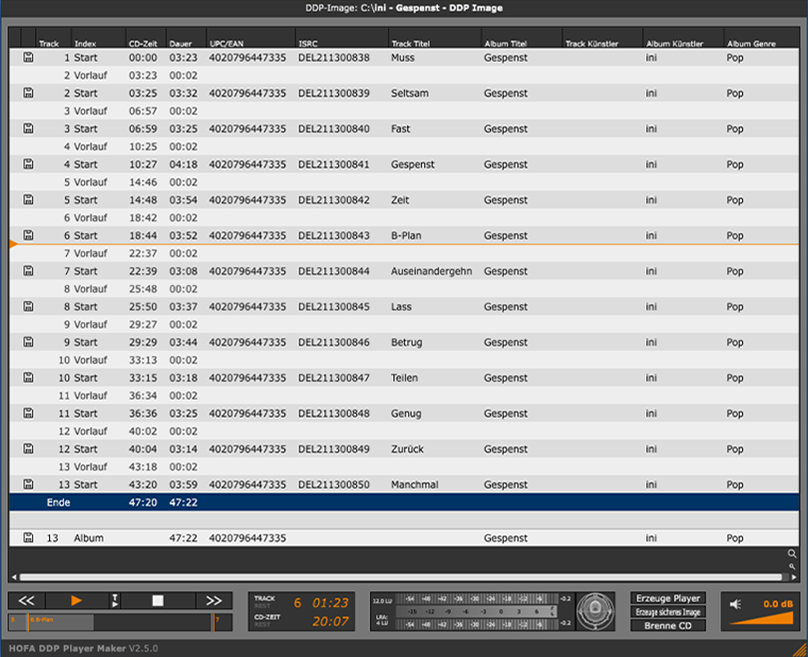
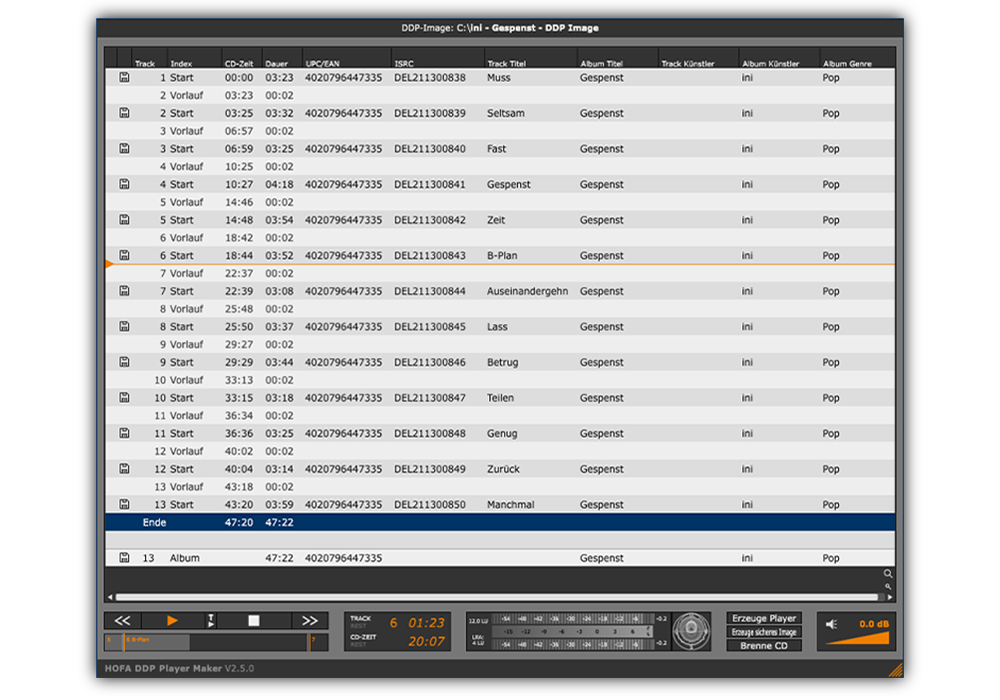
    The player supports CD-Text, UPC/EAN, and ISRC display, offers a Peak & EBU Loudness Meter, a Goniometer, and checks MD5 checksums for quality control.

The generated player runs on Windows and macOS and works exclusively with its associated DDP image.

You can create suitable DDP images with CD-Burn.DDP.Master.

Mainly for mastering engineers and recording studios who want to offer their clients (artists, labels, producers) a professional way to digitally audition and check the finished master – without the client needing to know or install special software themselves.

With the DDP Player Maker, you can optionally encrypt DDP images. An image secured in this way can only be opened and played with its specially generated, accompanying player – other software or tools won’t have access to the audio data.

As a mastering engineer, this gives you a crucial practical advantage: you can send your client the finished master for approval, even if the invoice hasn’t been fully paid yet. The client can listen to and evaluate the entire album – but has no way to export the individual tracks or use them otherwise, as long as they don’t possess the unencrypted files. Only after payment is received do you deliver the final, unprotected master.

This way, you combine professional customer service with the necessary security for your work.

Reviews

“Seemless integration with my plug-in tool box, intuitive functions and a great player for my clients makes the HOFA DDP Player Maker a ‘no brainer’ for my digital delivery needs.”

Mike “The Mix” Tarsia
Grammy Recognized Music Engineer, Gold and Platinum Awarded from Philadelphia
(Patti Labelle, Barry White, Vanessa Williams, Beverly Hills Cops, Coming To America, …)


I use HOFA DDP Player Maker every day. It’s effortless to use for sending off to CD manufacturing plants. But even more valuable is for sending to clients and producers to hear how the record is sequenced and how it flows in an easy and concise way. Clients like easy. And this software is anything but complicated and doesn’t need to be. It does exactly what it sets out to do – to make and play DDP masters. I love it for that and it’s why I use it every day for my clients.

Mat Leffler-Schulman (Mobtown Studios Baltimore)
Mixing Engineer / Mastering Engineer (Future Islands, The National Symphony Orchestra, Ice Cube, …)

“I really like the DDP player you provided to listen to the masters. The seamless playback and information displayed functions fantastically.”

– Justin Perkins, Mystery Room Mastering, USA

Professional Audio

No wishes remain unfulfilled thanks to the flexible options in the DDP Player Maker. The excuse of not being able to listen to a DDP image is now a thing of the past.

Final grade: very good – outstanding | Value for money: very good

Professional Audio

My clients are delighted. No software needs to be to installed, so it’s very easy for them to use it.
Exactly what I was looking for at an unbeatable price.

Mickael RANGEARD | QDS Mastering | France

1 review for DDP Player Maker V2

  1. German

    Peter König

    einfache und schnell zu bedienende Applikation. Im Studiobetrieb ein sinnvolles und vor allem, funktionierendes Werkzeug um Kunden ein DDP zur Abnahme incl. der META Daten zukommen zu lassen und im Anschluß das DDP dem Presswerk zur Verfügung zu stellen.

    Wir haben bereits die V 1.0 genutzt und kommen mit dem Nachfolger gut zurecht.

    Funktioniert halt.

    randomized-music GbR
    Peter König

    Verifizierter Kauf. Mehr Informationen

Show only reviews in English (0)

Add a review

Operating System: macOS 10.13 or later, Windows 10 or later

You have two licenses available. These are managed via the HOFA Plugins Manager, where they can also be deactivated and transferred to other computers.

It is also possible to activate and use HOFA plugins offline. Licenses on USB sticks can be used alongside USB licenses from other plugin manufacturers without any issues.

You can read the detailed manual here:

You will find helpful answers to many questions in our support center:

You can also reach us on weekdays at plugins@hofa.de and +49 7251 3472-444

DDP Player Maker V2

14 days free trial